
Drive Mad
Drive Mad
Having trouble loading? Retry the game or use another option below.
Play next

Bottle Jump

Orbit Dash

Poor Bunny

Wacky Flip
Block Master
Block Slide

Block Smash

Bombard Crocodilo Clicker

Cake Smash

Chill Clicker

Color Pencil Run

Color Rush
Crazy Mouse Battle

Deer Adventure
Escape Jump

Escape Road Halloween

Flappy Bird 2

Grow a Garden
Hockey Random
Italian Brainrot Clicker
Italian Brainrot Clicker 2

Jetski Race

Jumping Master
Merge Brainrot
Drive Mad
- Rating:
- Not rated yet
- Platform:
- Browser
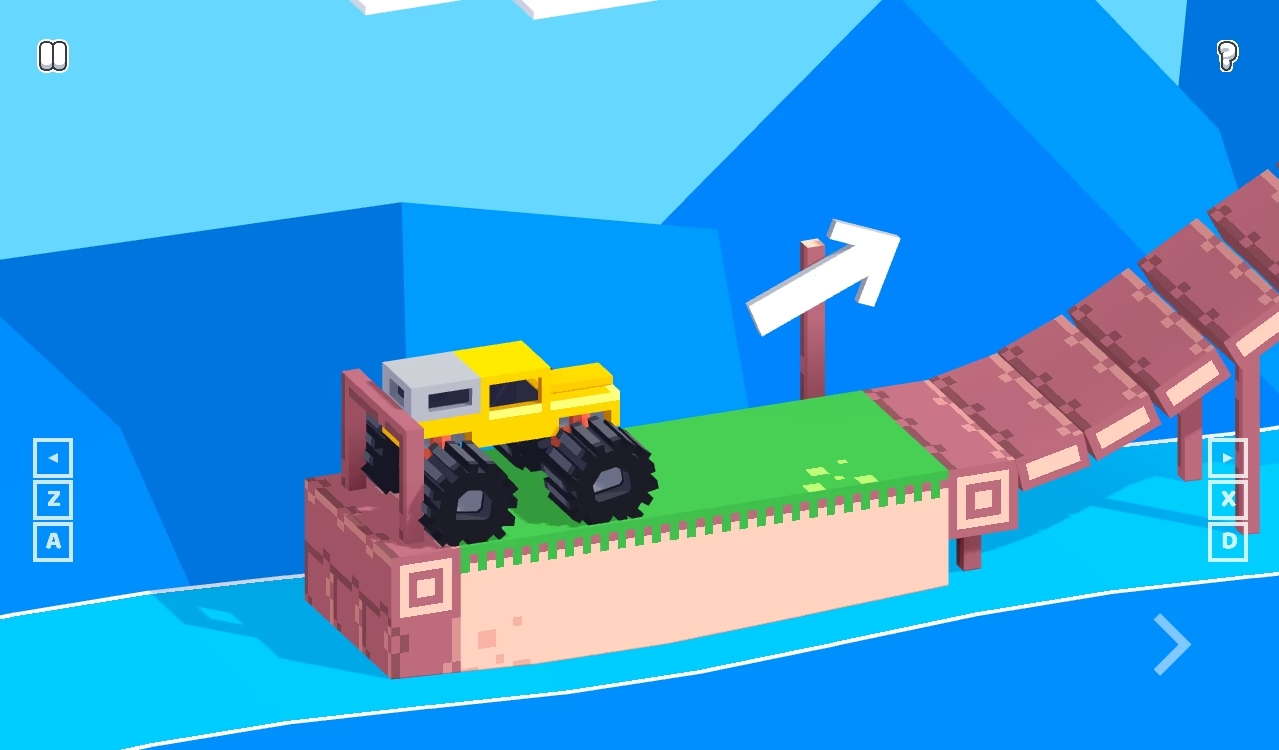
Drive Mad combines driving with the task of getting a truck through a compact obstacle course. Ramps, gaps and narrow bridges ask you to think about the vehicle's position as well as its speed. The opening bridge gives you room to connect a forward input with the motion of the wheels and body. Look ahead before committing to a longer hold: moving quickly is useful only when the next section leaves room to continue. Aim to reach the finish with the vehicle under control rather than treating every stretch as a straight race.
Explore more in Precision.
Gameplay: Drive Mad
The challenge is not simply holding an accelerator for as long as possible. A change in the course can alter the truck's attitude, so watch its body and wheels as it approaches a ramp or landing. Compare a short input with a longer hold, then adjust before the next transition. The opening route leads from a starting platform across a bridge to the finish. Use it to learn how forward motion carries the vehicle, and approach a new course as a fresh driving problem.
Show moreShow less
Key features of Drive Mad
Obstacle-course driving
A compact route brings platforms, bridges and course transitions close together, making the next piece of road part of every decision.
Visible vehicle balance
Read the truck's body angle and wheels alongside its forward movement as it reaches a change in the course.
Keyboard and touch options
Use the right arrow key on desktop or the visible lower-right arrow with touch to drive forward.
How to play Drive Mad
Choose Play and wait for the truck and course to appear. On desktop, hold the right arrow key to drive forward. On a touchscreen, hold the visible driving arrow at the lower right of the playfield. Watch the truck's angle as it reaches the bridge, and release an input when continued acceleration is not useful. Keep your attention on the road beyond the nearest transition. Use the game's own next-level or restart prompt when it appears. The page Restart button reloads the player, so keep it separate from the game's own controls.
Wait for the course
Start the player and wait until the truck, road and game controls are visible.
Drive forward
Hold the right arrow key on desktop or the lower-right driving arrow on a touchscreen.
Read the transition
Watch the vehicle before holding forward through a ramp, gap or landing. Adjust your next input from the motion you see.
Use the game's own prompt
When a next-level or restart prompt appears, use it to continue or try again. Keep those controls separate from the page's reload button.
Controls and device notes
| Action | Input | Notes |
|---|---|---|
| Drive forward | Hold the right arrow key | Click the playfield first if the game does not have keyboard focus. |
| Drive forward with touch | Hold the lower-right driving arrow | Use the arrow shown inside the playfield. |
| Reload the player | Page Restart button | Reloads the embedded game; do not assume that it resets or preserves saved progress. |
Desktop
Hold the right arrow key to drive forward. Keep the truck and the next course transition visible; use the in-game prompts for other actions.
Mobile & touch
Hold the visible lower-right driving arrow. Landscape can give a wider view of the road; choose an orientation that leaves the vehicle and touch controls readable.
Practical tips and mistakes to avoid
- Use the opening bridge to learn the response to a short hold before carrying the same input into a new course section.
- Watch the vehicle body as well as the road; reaching an obstacle is not the same as landing safely beyond it.
- Make one input change at a time so that a different landing can be connected to a specific decision.
- Read the next section before holding forward; a new ramp or gap can need a different approach.
- On a touchscreen, locate the visible driving arrow before beginning a longer hold.
Who might enjoy Drive Mad?
Drive Mad may suit players who enjoy adjusting a vehicle's movement through a course rather than competing in traffic. The useful comparison is how a change in input affects the next obstacle, not how often you press a button.
Why use this game page?
Player-first layout
The player and its loading status stay above the guide. Site advertisement slots are separate from the game controls.
Practical context
Use the contents links to find input instructions, device limitations and available game-specific notes without losing this page.
A relevant next step
Compare category and topic links, then choose another named game from the recommendations.
For a wider choice, browse the full browser-game catalog. A provider may apply its own cookies, ads or restrictions; read our privacy notes.
Questions about Drive Mad
What is the objective of Drive Mad?
Guide the vehicle through the obstacle course and reach the finish while keeping it under control. Read ramps and gaps before deciding how long to hold an input.
How do I drive forward on desktop?
Hold the right arrow key while the game has focus. Watch the vehicle's movement before continuing through a new course transition.
How do I use touch controls?
Hold the visible driving arrow at the lower right of the playfield. Use the arrows inside the game, not the buttons around the page.
Should I use portrait or landscape?
Landscape can give you a wider view of the course. Use the orientation that keeps the vehicle, road and driving controls readable on your device.
What is the difference between Restart and the game menu?
The page Restart button reloads the embedded player. Next Level and the game's own restart prompt belong to the game itself. Saved-progress behavior can differ from a simple page reload.
Game provider
Guides that discuss Drive Mad
For more context, read Help with a browser game that will not start.